Straveo

Case Study

Same recipe, same run: production group planning at Flora Food Group

Same recipe, same run: production group planning at Flora Food Group
Home› Insights› Case Study
Flora Food Group
Client case study · SAP IBPDelivered by Straveo

How grouping products that share a recipe in SAP IBP removed line crossovers and capacity overloads, and cut setup, labour and wastage costs.

€3.0bnnet sales value, 2025
1.0%net sales CAGR, 2019 to 2025
100+countries served
14manufacturing sites
01

Client and context

Headquartered in Amsterdam with 150+ years of heritage, Flora Food Group delivers culinary essentials across butters and spreads, creams, sauces and liquids, and cheeses, through brands such as Flora, Becel+ProActiv, Blue Band, Country Crock, Rama and Violife.

Many products share the same flavours and ingredients. On the factory floor, several finished goods can run from one recipe, if the plan brings them together.

Source: Flora Food Group Annual Report 2025
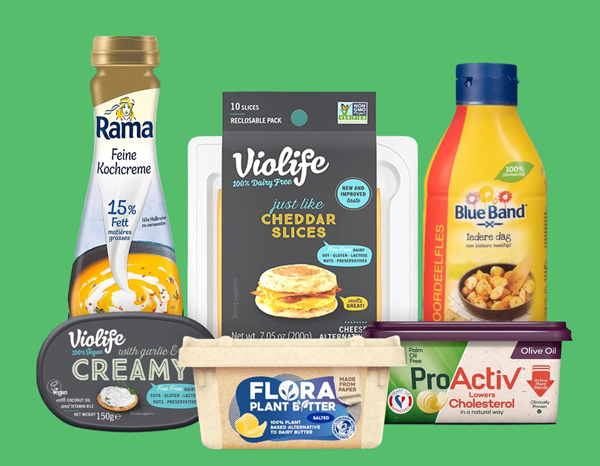
Flora Food Group products including Rama, Violife, Blue Band, Flora and ProActiv
02

The problem

Three Flora Plant Butter finished goods share one recipe. Each had its own demand, but with no grouping, that demand never came together at the shared semi-finished good (SFG) and raw materials (RM). Dependent demand was scattered across different weeks.
Demand stays apartEach FG passed its demand to the recipe on its own, in its own week.
Same recipe, many runsOne recipe ran several times on different lines and weeks.
Costs and waste upMore setups meant higher setup and labour costs, more wastage and strained resources.
Planner burdenPlanners had to stitch together both quantity and sequence by hand.
One mixer, three packaging lines, demand in three different weeksRaw materials become one SFG in the mixer, which is packed into three tubs on three lines, yet each tub’s demand lands in a different week.
RAW MATERIALS (RM)Plant oil blend
Water
Salt
Emulsifier
MixerSFG · Plant butter base
LINE 1
Plant Butter Tub
W1demand
W2
W3
W4
W5
W6
LINE 2
Plant Butter Tub
W1
W2
W3demand
W4
W5
W6
LINE 3
Plant Butter Tub
W1
W2
W3
W4
W5demand
W6
Same SFG and RM called three times, not once
Dependent demand scattered over W1, W3 and W5
Three mixer batches and setups for one recipe
03

How it works in IBP: before and after

GRP_PlantButter brings the three FGs that share one recipe into a single group product, which is the input to the IBP optimizer. The optimizer plans the group with its setup cost and capacity counted once per period. Based on the maintained attribute values, orders then flow to each FG and, through the BOM, to the SFG and RM.

GROUP PRODUCTGRP_PlantButter
100 g
200 g
500 g
input
IBP OPTIMIZERPlans the groupSetup and cost once per period
attribute values
Plant Butter Tub 100 g
Plant Butter Tub 200 g
Plant Butter Tub 500 g
BOM
SFGPlant butter base
BOM
RMPlant oils, water, salt, emulsifier
Optimizer levers for the group:Fixed setup capacityFixed group costMinimum output
Before: planned FG by FGProduction and dependent demand by week
W1W2W3W4W5W6
No group
Plant Butter Tub
100 g
Plant Butter Tub
200 g
Plant Butter Tub
500 g
SFG and RM
dependent demand
3 setups3 runsSFG and RM called in 3 weeks
After: planned as GRP_PlantButterGroup planned in W1, orders flow to FGs, SFG and RM
W1W2W3W4W5W6
GRP_
PlantButter
1
setup
Plant Butter Tub
100 g
Plant Butter Tub
200 g
W3
Plant Butter Tub
500 g
W5
SFG and RM
dependent demand
1 setup1 runSFG and RM called once
SetupOriginal demand weekThe optimizer pulls demand forward when the setup saved outweighs the cost of holding stock. Weeks are illustrative.
Executed with the SAP IBP Optimizer.
04

Solution and implementation

PROPOSED SOLUTION

Straveo recommended group planning within Flora’s SAP IBP tenant, using grouping attributes that match business needs, so the three FGs are planned together as GRP_PlantButter, orders flow down correctly to FGs, SFG and RM, and lines become clearer and more direct.

IMPLEMENTATION

Built on Flora’s existing master and transactional data, with an automated group products master data type and maintenance rules, so the process runs with very little manual effort.

1Maintain attributesPlanners set the grouping attribute values on the FG master data.
2Rules propagateMaster data maintenance rules push the values down automatically.
3Group product createdAn automated master data type builds GRP_PlantButter from the three FGs.
4Optimizer plans the groupGRP_PlantButter is the optimizer input, so setups, costs and minimum batches are planned once.
5Orders flow downBased on attribute values, orders flow to each FG, then through the BOM to SFG and RM.
05

Impact on the business

Before vs after group planning

BeforeAfter
Capacity overloadLower
Setup and labour costLower
WastageLower
Working capital tied upLower
Plan reliabilityHigher

Bars show the direction of change and are not to scale.

WORK WITH STRAVEOShared recipes deserve a shared plan.

If similar products are planned apart in your network, there may be capacity, cost and material efficiency waiting to be unlocked. Our SAP IBP team can help you find it.

1Planning efficiency reviewWhere grouping could ease capacity and cut setups
2Group planning implementationDesign, build and roll-out in your IBP tenant
3IBP Optimizer enablementSet-up, tuning and planner adoption
Start a conversation

Tell us about your planning challenge and the right Straveo expert will reach out.

  • Efficiency review
  • Group planning
  • Optimizer
Request a conversation

Reading is fine. Doing is better.

Show me my AI maturity level